Introduction
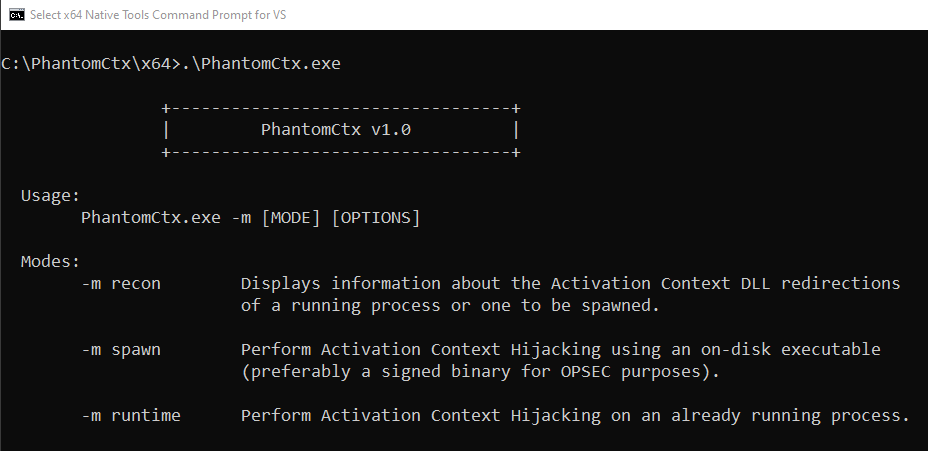
In this post, we’ll take an in-depth look at the new tool I’ve developed to facilitate DLL hijacking in Red Team operations: PhantomCtx.
What is PhantomCtx?
PhantomCtx is a tool that automates Activation Context hijacking with the objective of loading an arbitrary DLL into the vast majority of signed executables (e.g. Microsoft, Adobe, Mozilla).
The loader is presented as a modern alternative to traditional DLL Hijacking and Sideloading techniques: unlike conventional approaches where you need to find a signed vulnerable binary on the target system or rely on known vulnerable Microsoft binaries listed on pages such as HijackLibs (that are usually monitored), the tool does not require a specific binary vulnerable to DLL hijacking.
As long as the target executable imports a DLL through its Import Address Table (IAT) (which covers almost every binary on the system), it is a valid target for PhantomCtx.
Let’s take a closer look at how it works under the hood.
Background
While exploring DLL internals, I came across a well-known and legitimate mechanism in the Windows Loader that has been exploited for many years: DLL Search Order.
This is essentially the lookup order followed by the Windows Loader to resolve a DLL when a program requests it without specifying an absolute path. This can occur in two scenarios:
- Loading via the Import Address Table (IAT)
- Loading via
LoadLibrarywithout specifying an absolute path (e.g.LoadLibraryW("advapi32.dll"))
When the Loader needs to locate a DLL without knowing its full path, it will perform a predefined search following these steps:
- DLL Redirection.
- API sets.
- SxS manifest redirection.
- Loaded-module list.
- Known DLLs.
- The package dependency graph of the process.
- The folder from which the application loaded.
- The system folder (
C:\Windows\System32\). - The 16-bit system folder (
C:\Windows\System\). - The Windows folder (
C:\Windows\). - The current folder.
- The directories that are listed in the PATH environment variable.
After a research attempt that failed to hijack the API Set paths (since it was only possible to hijack the DLL name without the possibility of specifying an alternative path because the Loader would always load it from C:\Windows\System32), I decided to explore the third step on the list: SxS manifest redirection.
Before diving into the Activation Context Hijacking exploitation, it is necessary to understand several underlying concepts that form the foundation of this attack.
SxS (Side-by-Side) Subsystem
The Side-by-Side (SxS) subsystem is a Windows operating system mechanism designed to safely manage version control for shared libraries (DLLs) and COM components.
Its main objective is to resolve dependency conflicts by isolating executions, allowing multiple versions of the same library to coexist on the same system and be loaded simultaneously in different processes or even within the same process.
This eliminates the DLL Hell problem, where multiple applications would overwrite the same system-wide DLL during installation because each required a specific version, breaking all other applications that depended on it.
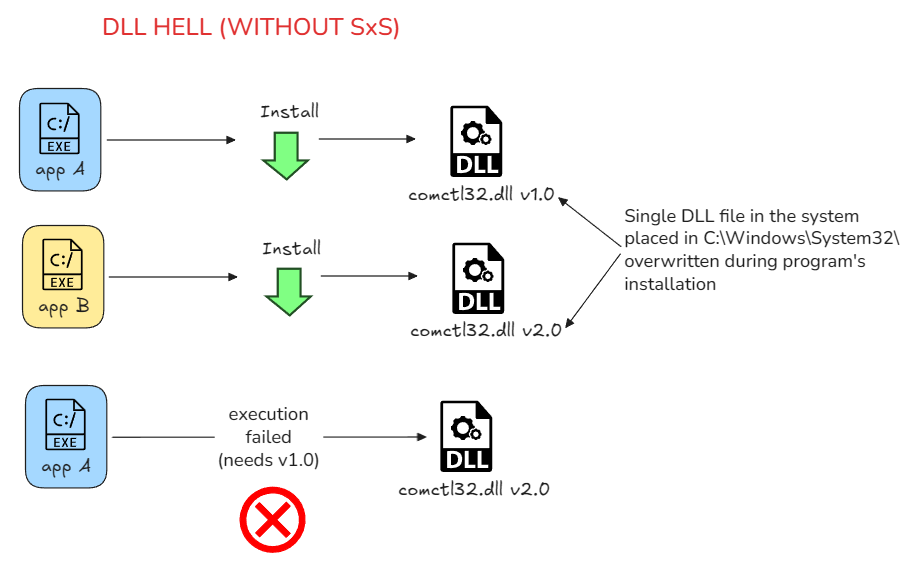
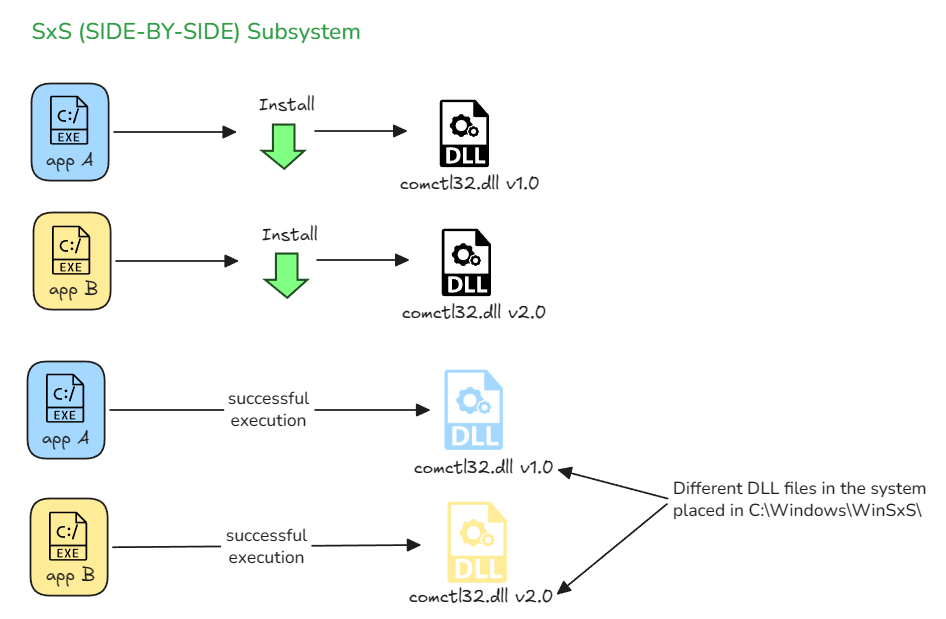
The SxS Subsystem architecture is mainly composed of two elements:
- Assemblies
- Manifests
1. Assemblies
An Assembly is the logical unit of versioning and implementation in the SxS ecosystem. Physically, it consists of one or more files (such as .dll, .tlb, .exe) grouped under a unique identity.
The global assembly repository in Windows is located at %WINDIR%\WinSxS.
The identity of an assembly is defined by a strict tuple:
- Name: Logical name (e.g.,
Microsoft.Windows.Common-Controls). - Version: Strict 4-part version (e.g.,
6.0.0.0). - ProcessorArchitecture: Target architecture (
amd64,x86,msil). - PublicKeyToken: Hash of the signer’s public key, guaranteeing integrity.
- Language: Language code, generally
*for neutral assemblies.
2. Manifests
A manifest is an XML document that declares the identity of an assembly, the files it contains, the dependencies on other assemblies, and the COM classes it exports.
Manifests can be provided in two ways:
- Embedded: As a binary resource of type RT_MANIFEST (ID
24or0x18in hex) in the .rsrc section of an executable or DLL. - External: As a file on disk with a
.manifestextension adjacent to the executable.
A SxS manifest looks like the following:
<?xml version="1.0" encoding="UTF-8" standalone="yes"?>
<assembly xmlns="urn:schemas-microsoft-com:asm.v1" manifestVersion="1.0">

  <assemblyIdentity
    name="Microsoft.Windows.Common-Controls"
    version="6.0.0.0"
    type="win32"
    processorArchitecture="amd64"
    publicKeyToken="6595b64144ccf1df"
    language="en-us"/>

  <file name="comctl32.dll"/>

</assembly>
Based on the assembly attributes, the system will create a uniquely identified folder under C:\Windows\WinSxS. The folder name is formed as follows:
<processorArchitecture>_<name>_<publicKeyToken>_<version>_<language>_<random-hash>
For example, for the manifest above, all resources will be contained in the following folder:
amd64_microsoft.windows.common-controls_6595b64144ccf1df_6.0.0.0_en-us_<random-hash>
But, who tells the Loader where the correct DLL path is located? This is where Activation Contexts come into play.
Activation Contexts
During process creation, one of the fundamental steps is Perform post-creation, Windows subsystem-specific process initialization.
In this step, the Loader performs various Windows subsystem-specific operations to complete process initialization. Briefly, the sub-steps are as follows:
- Various checks are made for whether Windows should allow the executable to run.
- If software restriction policies dictate, a restricted token is created for the new process.
CreateProcessInternalWcalls some internal functions (for non-protected processes) to get SxS information such as manifest files and DLL redirection paths.- A message to the Windows subsystem is constructed based on the information collected to be sent to Csrss. The message includes the following information:
- Path name and SxS path name
- Manifest file information
- DLL redirection and .local flags
- Additional subsystem-related information required by CSRSS
Upon receiving this message, the Windows subsystem performs, among other tasks, parsing and organizing the information contained in the manifest.
All manifest information sent in the previous message is structured and synthesized into data structures known as Activation Contexts.
Activation Contexts reside in a read-only memory region mapped into the Virtual Address Space (VAS) of the created process.
To identify the address where they are located, the Loader references the following members of the TEB and PEB structures, in the order indicated:
TEB.ActivationStack: contains the address of a memory region holding the Activation Context stack for the current thread scope. When an Activation Context is active (at the top of the stack), its DLL redirections apply exclusively to that thread.PEB.ActivationContextData: contains the address of the memory region holding the Activation Context that applies to all threads in the process. If the Loader does not find a valid redirection inTEB.ActivationStack, it falls back to this location.PEB.SystemDefaultActivationContextData: contains the address of the memory region holding the system-wide default Activation Context shared across all processes. This will not be modified under any circumstances.
Of the three locations, TEB.ActivationStack is excluded as the primary vector for two reasons: its scope is exclusively thread-scoped and, in practice, most signed binaries do not activate any Activation Context at the thread level (based on my experience analyzing with WinDbg).
PEB.ActivationContextData offers clear advantages over the above. By hijacking this region, we ensure the Loader always falls back to the PEB when no redirection is found in TEB.ActivationStack. This is especially relevant when targeting a DLL whose entry does not exist in the process’s original Activation Context: with no match in the TEB, the Loader will always consult the PEB, making the vector predictable and reliable regardless of the target binary.
Internally, an Activation Context contains a Table of Contents (ToC) indexing multiple sections. The section of our interest is the DLL redirection section (identified by Id == 2).
This section contains the DLL redirections specified within the Activation Context. Each redirection for a specific DLL is represented as an entry.
Below is a simplified diagram of its internal structure:
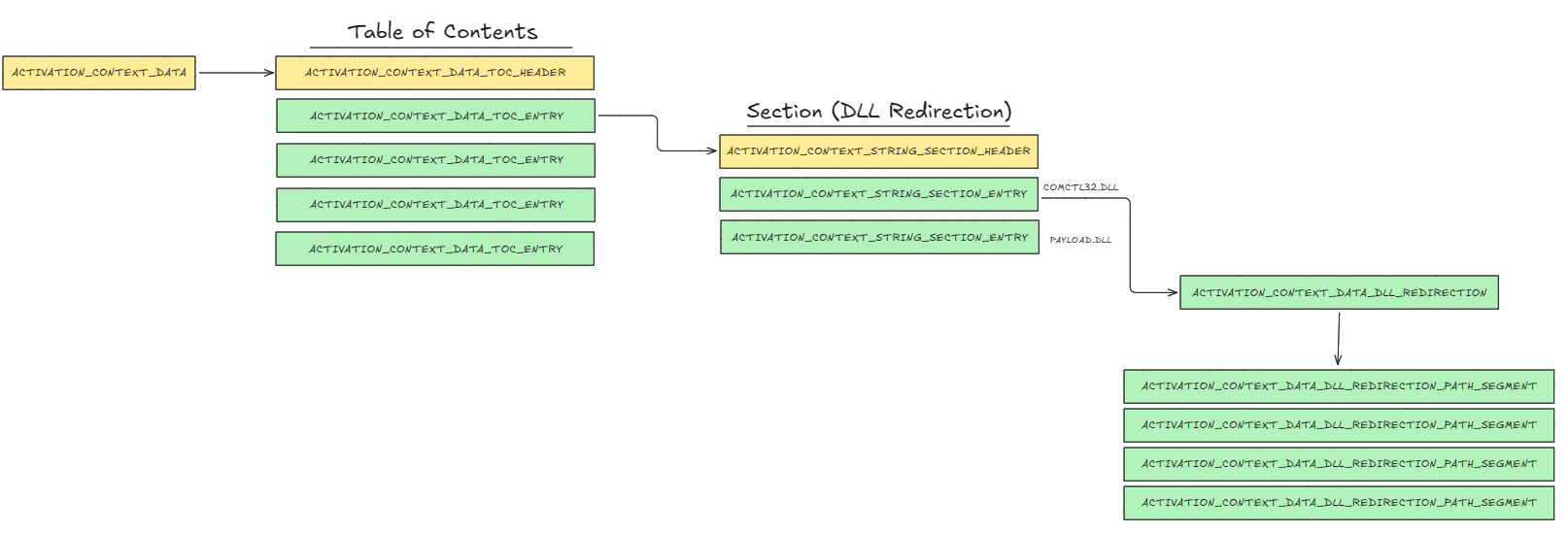
It is worth remembering that the DLL redirection section is consulted even before checking whether the DLL is already loaded in the process or present on disk; this is precisely what makes Activation Contexts so powerful as an exploitation vector.
Seeing all of this, my hypothesis was:
“If a malicious Activation Context containing DLL redirections is built and injected into a process being created, and the previously mentioned pointers are modified to point to our malicious Activation Context, we will be able to redirect the loading of any DLL.”
However, before starting my own research, I looked into whether anyone else had already discovered this vector. And indeed they had: I came across the excellent research by Kurosh Dabbagh.
Activation Context Hijacking (Part 1 of Research)
As the name suggests, Activation Context Hijacking consists of hijacking the Activation Context of a process spawned in a SUSPENDED state, so that when it is resumed, the loading of a DLL specified in the malicious Activation Context is redirected, loading our custom DLL payload in the process.
There are several methods to carry out this attack. The attack vector exploited by Kurosh in his loader Eclipse works as follows:
- A malicious Activation Context is created locally using
CreateActCtxW, either from an external.manifestfile or from a resource embedded in the loader itself. - The internal Activation Context data structure is located by dereferencing the handle returned by
CreateActCtxWand querying its memory region viaVirtualQuery. - The Activation Context data is copied into a local buffer.
- The target process is spawned in suspended mode using
CreateProcessW. - Memory is allocated in the remote process using
NtAllocateVirtualMemory. - The malicious Activation Context data is written into the allocated memory using
NtWriteVirtualMemory. PEB.ActivationContextDataof the suspended process is overwritten usingNtWriteVirtualMemoryto point to the injected Activation Context.- The process is resumed using
ResumeThread.
However, the way PhantomCtx operates with Activation Contexts is considerably different. Rather than relying on CreateActCtxW to build the malicious Activation Context, I decided to make it harder for defenders to identify the purpose of the loader based solely on its behavior.
The starting point of my research was to identify the possible scenarios we might encounter when exploiting this technique, and to define how to handle each of them with a creative attack vector:
All cases are evaluated against the Activation Context of the suspended process of the target program.
- No valid Activation Context -> the Activation Context is stolen from an already running process on the system that has a valid DLL redirection section.
- Activation Context present, but no DLL redirection section (Id == 2) in its Table of Contents (ToC) -> the Activation Context is stolen from an already running process on the system that has a valid DLL redirection section.
The only requirement for cases 1 and 2 is that the process from which the Activation Context is stolen must have a valid DLL redirection section.
- Activation Context with DLL redirection section, but no interesting DLL entry for hijack -> a new entry is crafted from scratch.
- Activation Context with DLL redirection section and an interesting DLL entry for hijack -> only the path pointed to by that entry is patched.
The solutions outlined above were just hypotheses at this point, so it was time to get to work.

The step involved in stealing the Activation Context from a remote process is not as complex as it might seem, since it does not require a deep understanding of the internal structures or their inner workings. It simply consisted of reading the entire memory region using NtReadVirtualMemory and copying it into a local buffer.
However, the number of hours spent studying and analyzing the internal structures of the Activation Contexts, and more specifically those that made up the DLL redirection section in order to manually craft the entries, was no joke.
Finally, I was able to reproduce the entire attack chain: stealing the Activation Context from a remote process, patching and manually modifying the internal structures, and then injecting the Activation Context into the suspended process of the target program.
Therefore, the attack vector exploited by the spawn module in PhantomCtx worked as follows:
- The Activation Context blob is copied from a remote stealing process into a local heap buffer using
NtReadVirtualMemory. - The local buffer is reallocated with extra space to accommodate modifications.
- The blob is patched depending on the scenario: an existing DLL redirection entry is either patched with a new path, or a completely new entry is crafted and injected into the DLL redirection section.
- The target process is spawned in suspended mode using
CreateProcessW. - Memory is allocated in the remote process using
NtAllocateVirtualMemory. - The malicious Activation Context data is written into the allocated memory using
NtWriteVirtualMemory. PEB.ActivationContextDataof the suspended process is overwritten usingNtWriteVirtualMemoryto point to the injected Activation Context.- The process is resumed using
ResumeThread.
The technique worked perfectly: the target program loaded the custom DLL without any issues. Everything was fine until I tested it in a Windows 11 lab with Elastic XDR with all rules activated to evaluate its behavior against aggressive defenses.
It was detected with Critical alerts. I also tested the Eclipse loader. The same alerts were triggered.
I came to the conclusion that the detection was caused by the way the Activation Context was being hijacked in the suspended process of the target program.
I didn’t expect this to lead me to the second part of my research: developing a new implementation of the Activation Context Hijacking technique capable of evading aggressive security detections.
Elastic EDR Detection Rules
When running both loaders, three Critical alerts were triggered, all related to remote process memory writes.

Fortunately, Elastic’s rules are public and accessible in their GitHub repository. This made it much easier to analyze exactly why PhantomCtx and Eclipse was being detected.
1. Potential Suspended Process Code Injection
This rule triggers when all of the following conditions are met simultaneously:
WriteProcessMemoryor underlying functions (e.g.NtWriteVirtualMemory) are called targeting a remote process (cross-processbehavior).- The target process was created in a suspended state (
created_suspended == true). - The write size is ≥ 4,000 bytes.
CreateProcessWis not present in the call stack; this filters out legitimate writes that occur during normal process creation.- The final user module in the call stack is unsigned or untrusted (
trusted == falseorexists == false).
To evade this rule, my first idea was to use sections to map the malicious Activation Context as read-only into the suspended process using NtCreateSection and NtMapViewOfSection. This way, NtWriteVirtualMemory would only be needed to overwrite the PEB.ActivationContextData pointer (a write of just 8 bytes), which would no longer satisfy the 4,000-byte condition required to trigger the rule.
2. Remote Memory Write to Trusted Target Process
This rule triggers when all of the following conditions are met simultaneously:
WriteProcessMemoryor underlying functions (e.g.NtWriteVirtualMemory) is called targeting a different remote process (cross-processbehavior, whereTarget.process.executable != process.executable).- The target process executable is located in a trusted path (
C:\Windows\*orC:\Program Files*). - The final user module in the call stack has no trusted code signature (
trusted != true). - The call stack summary does not contain Unknown in the API summary.
CreateProcessWis not present in the call stack when writing toPEB,PEB32orProcessStartupInforegions.ntdll.dll!Ldr*functions are not present in the call stack.- The final user module is not located in trusted paths (
Program Files,Windows\WinSxS, system DLLs). - The final user module is not categorized as
Unknown,UndeterminedorKernel.
To evade this rule as well, my idea was to combine the previous evasion with copying a signed binary to a folder outside of C:\Windows\* and C:\Program Files* (without requiring it to be vulnerable to DLL Hijacking) and applying the same Activation Context Hijacking technique. By breaking the path location condition, no alerts would be triggered.
However, this would considerably reduce the flexibility and scope of the attack vector.
3. Remote Process Memory Write By Low Reputation Module
This rule triggers when all of the following conditions are met simultaneously:
WriteProcessMemoryor underlying functions (e.g.NtWriteVirtualMemory) is called targeting a different remote process (cross-processbehavior, whereTarget.process.executable != process.executable).- The final user module in the call stack has no trusted code signature (
trusted != true). - The call stack summary does not contain
Unknownin the API summary. CreateProcessWis not present in the call stack when writing toPEB,PEB32orProcessStartupInforegions.- The final user module is not located in trusted paths (
Program Files,Windows\WinSxS,system DLLs). - The final user module is not categorized as
Unknown,UndeterminedorKernel. - The endpoint has reputation checking enabled (
reputation = true).
I’m not going to lie: seeing that any use of NtWriteVirtualMemory by a module without a good reputation stored in Elastic’s cloud servers would be flagged was pretty intimidating.
This is by far the hardest rule to evade, since any use of NtWriteVirtualMemory would be detected. This means we cannot even overwrite the PEB.ActivationContextData pointer to hijack the Activation Context, a critical requirement for performing the attack.
Looking for a New Approach for Evasion (Part 2 of Research)
Seeing all these detections triggered by the use of NtWriteVirtualMemory, I decided to look for a cleaner and stealthier alternative for the Activation Context Hijacking technique.
The conditions we were working with were the following:
NtWriteVirtualMemoryand its derivatives are aggressively monitored, making it impossible to even overwrite thePEB.ActivationContextDatapointer.- The memory region where Activation Contexts reside is read-only, so directly modifying its contents is not an option either.
While reviewing my Windows Internals notes, I came across one titled File Memory Mapping. Although it didn’t seem immediately relevant, I paused for a moment to read the following section:

That’s when a new hypothesis hit me: even though this applies to file-backed sections, shouldn’t it work the same way for regular memory blocks?
Since Activation Contexts reside in a mapped read-only region, the following attack vector came to mind:
- Unmap the view of section originally created for the Activation Contexts during process initialization, leaving that memory region invalid.
- Create a section and write our modified Activation Context buffer into it.
- Map a read-only view of that section into the suspended process of target program at exactly the same address where the original region was mapped.
To help clarify the concept, I created three diagrams to provide a high-level overview of how View and Section objects work:
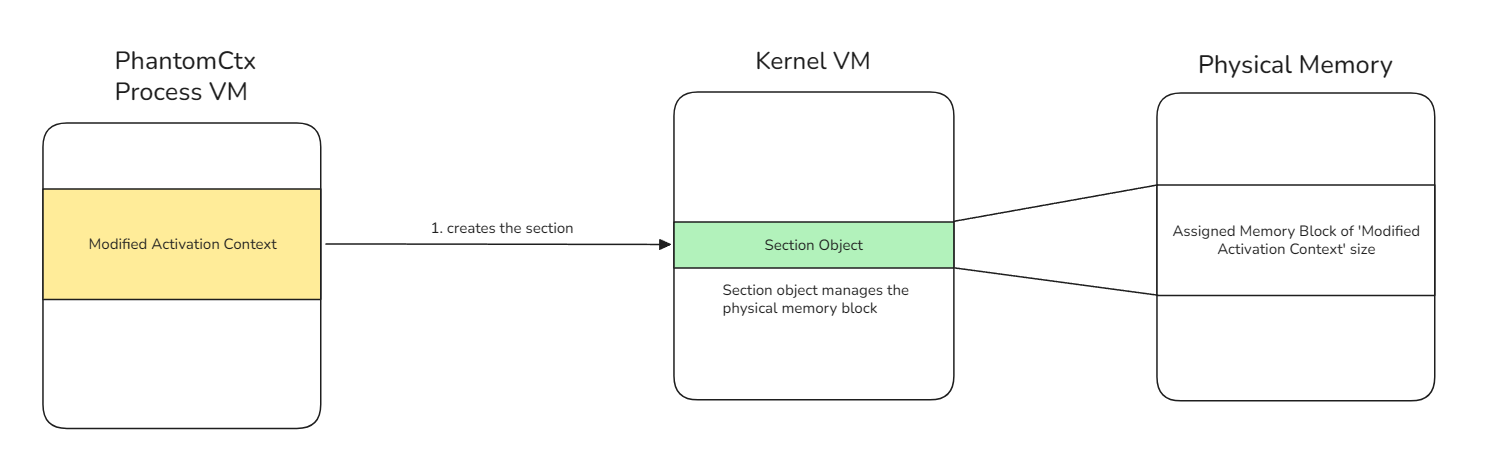
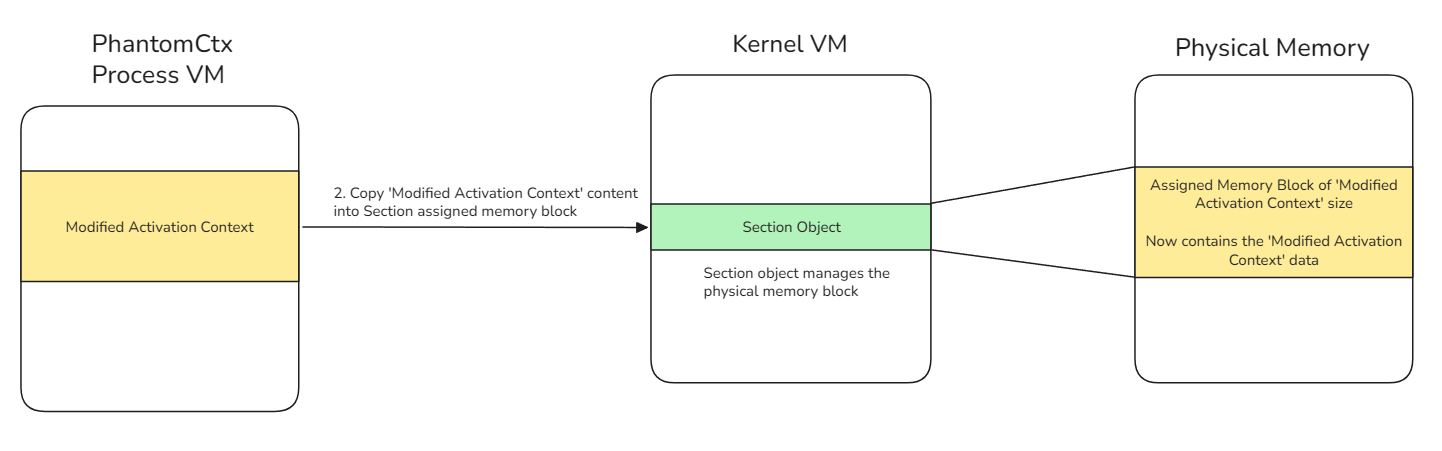
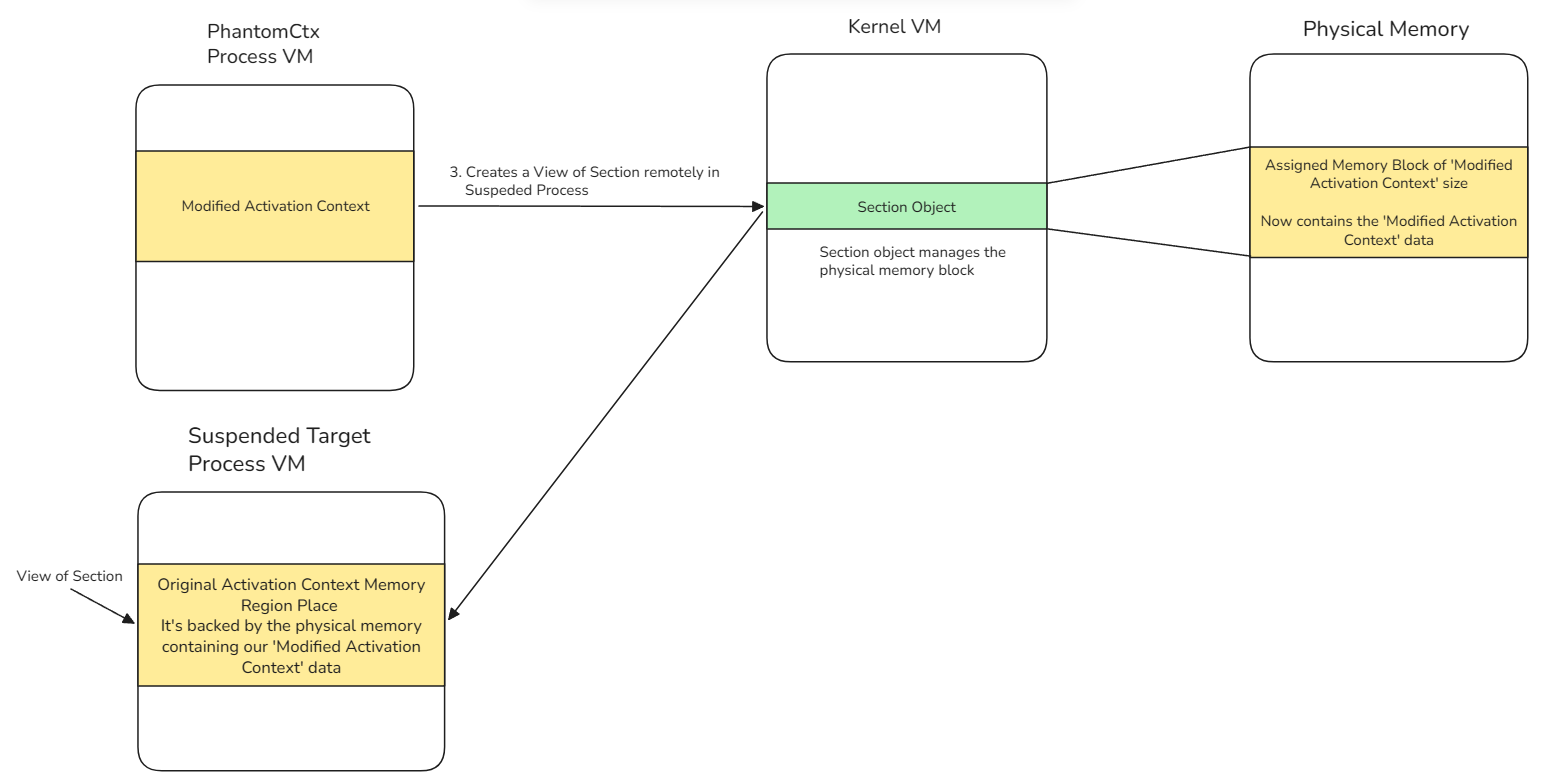
This way, we would replace the original Activation Context memory region with our malicious one, at the exact address already pointed to by PEB.ActivationContextData.
Therefore, there would be no need to use NtWriteVirtualMemory or NtAllocateVirtualMemory; we would simply be creating a read-only view of a section, which is entirely legitimate behavior.
At this point, I decided to fully reimplement the entire attack vector used in PhantomCtx, eliminating any dependency on remote memory write operations and evading all detections related to cross-process memory writes:
- The Activation Context blob is copied from a remote stealing process into a local heap buffer using
NtReadVirtualMemory. - The local buffer is reallocated with extra space to accommodate modifications.
- The blob is patched depending on the scenario: an existing DLL redirection entry is either patched with a new path, or a completely new entry is crafted and injected into the DLL redirection section.
- The target process is spawned in suspended mode using
CreateProcessW. - The address of
PEB.ActivationContextDatais read from the suspended process usingNtReadVirtualMemory. - An anonymous page-file-backed section is created using
NtCreateSectionand the patched blob is copied into it via a local view mapped withNtMapViewOfSection. - The original Activation Context memory region is unmapped from the suspended process using
NtUnmapViewOfSection. - The malicious section is remapped at the exact same address in the suspended process using
NtMapViewOfSection, leavingPEB.ActivationContextDatapointing to our malicious Activation Context without any memory write operation. - The process is resumed using
ResumeThread.
The code for the function that unmaps the original Activation Context region and replaces it with the modified one (the previously detected component, now fully evading detection) is as follows:
// Hijacks the memory region by unmapping the original Activation Context and mapping the patched one
NTSTATUS HijackActCtx(
    fnNtReadVirtualMemory         pNtReadVirtualMemory,
    fnNtCreateSection             pNtCreateSection,
    fnNtMapViewOfSection          pNtMapViewOfSection,
    fnNtUnmapViewOfSection        pNtUnmapViewOfSection,
    fnNtQueryInformationProcess   pNtQueryInformationProcess,
    HANDLE                        hProcess,
    void*                         actCtxBlob,
    SIZE_T                        actCtxSize
){
    NTSTATUS status;

    // Get PEB address of the target (suspended) process
    PROCESS_BASIC_INFORMATION pbi = { 0 };
    ULONG returnLength = 0;
    status = pNtQueryInformationProcess(hProcess, ProcessBasicInformation, &pbi, sizeof(pbi), &returnLength);
    if (!NT_SUCCESS(status)) {
        printf("[ERROR] NtQueryInformationProcess failed: 0x%08lX\n", status);
        return status;
    }

    // Read the pointer at PEB+0x2F8 (ActivationContextData) - this is the kernel-set address
    PVOID originalAddr = NULL;
    SIZE_T bytesRead = 0;
    status = pNtReadVirtualMemory(hProcess, (PVOID)((ULONG_PTR)pbi.PebBaseAddress + 0x2F8), &originalAddr, sizeof(PVOID), &bytesRead);
    if (!NT_SUCCESS(status)) {
        printf("[ERROR] NtReadVirtualMemory (PEB.ActivationContextData) failed: 0x%08lX\n", status);
        return status;
    }
    printf("[INFO] Original PEB.ActivationContextData = %p\n", originalAddr);

    // Create an anonymous page-file-backed section sized to our patched blob
    LARGE_INTEGER secSize;
    secSize.QuadPart = (LONGLONG)actCtxSize;
    HANDLE hSection = NULL;
    status = pNtCreateSection(&hSection, SECTION_ALL_ACCESS, NULL, &secSize, PAGE_READWRITE, SEC_COMMIT, NULL);
    if (!NT_SUCCESS(status)) {
        printf("[ERROR] NtCreateSection failed: 0x%08lX\n", status);
        return status;
    }

    // Map the section locally and copy the patched blob into it
    PVOID localView = NULL;
    SIZE_T localViewSize = 0;
    status = pNtMapViewOfSection(hSection, NtCurrentProcess(), &localView, 0, 0, NULL, &localViewSize, ViewUnmap, 0, PAGE_READWRITE);
    if (!NT_SUCCESS(status)) {
        printf("[ERROR] NtMapViewOfSection (local) failed: 0x%08lX\n", status);
        CloseHandle(hSection);
        return status;
    }
    memcpy(localView, actCtxBlob, actCtxSize);
    pNtUnmapViewOfSection(NtCurrentProcess(), localView);
    printf("[SUCCESS] Patched blob written to section (%zu bytes)\n", actCtxSize);

    // Unmap the original kernel-mapped ActivationContextData region
    status = pNtUnmapViewOfSection(hProcess, originalAddr);
    if (!NT_SUCCESS(status)) {
        printf("[ERROR] NtUnmapViewOfSection (original) failed: 0x%08lX\n", status);
        CloseHandle(hSection);
        return status;
    }
    printf("[SUCCESS] Original Activation Context region unmapped @ %p\n", originalAddr);

    // Remap our section at the exact same address - PEB pointer stays valid
    PVOID remoteBase = originalAddr;
    SIZE_T remoteViewSize = 0;
    status = pNtMapViewOfSection(hSection, hProcess, &remoteBase, 0, 0, NULL, &remoteViewSize, ViewUnmap, 0, PAGE_READWRITE);
    if (!NT_SUCCESS(status)) {
        printf("[ERROR] NtMapViewOfSection (remote) failed: 0x%08lX\n", status);
        CloseHandle(hSection);
        return status;
    }
    printf("[SUCCESS] Patched Activation Context mapped at %p (same address)\n", remoteBase);

    CloseHandle(hSection);
    return STATUS_SUCCESS;
}
Ultimately, PhantomCtx is capable of redirecting any DLLs specified in the Import Address Table (IAT) of the target signed executable to our payload DLL, while remaining undetected under all Elastic XDR rules.
In this case, I use mpnotify.exe as an example, redirecting the advapi32.dll library specified in its IAT. The payload simply opens a calculator, but can be weaponized with any payload of your choice.
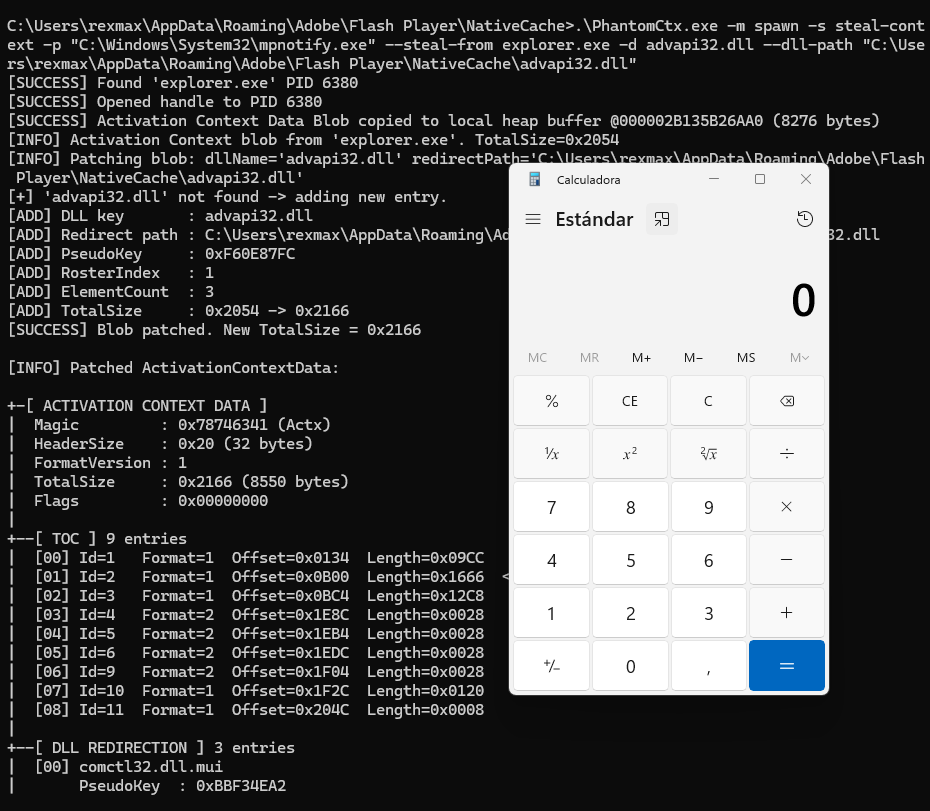
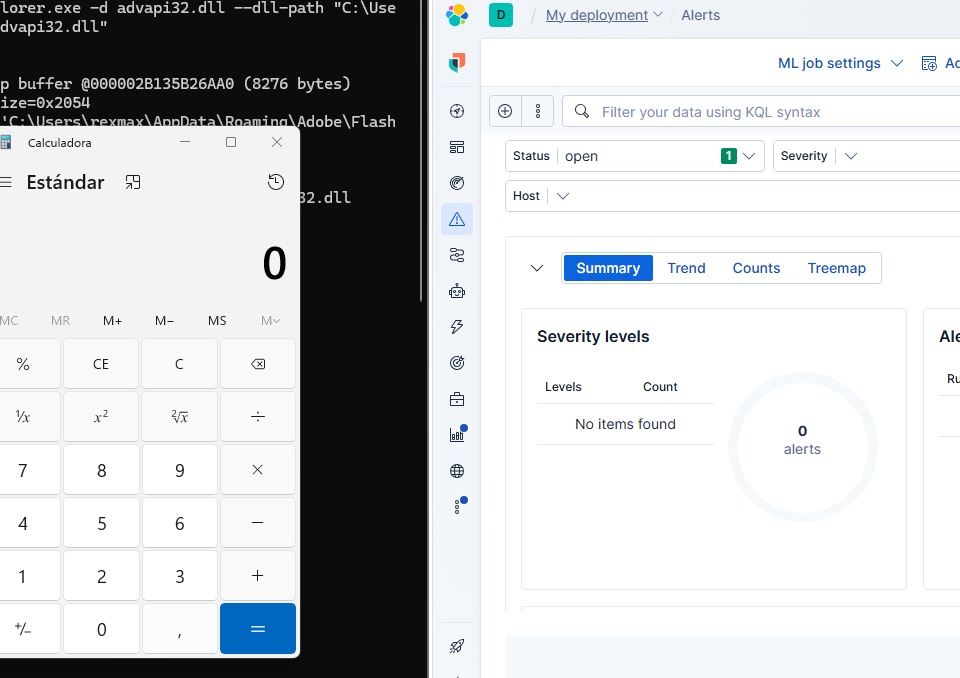
As you can see, not a single alert was triggered.
Why Use PhantomCtx in Your Engagements?
Activation Context Hijacking, and more specifically the way PhantomCtx exploits it, offers significant advantages over traditional techniques such as Process Hollowing, Process Injection, DLL Injection, or Callback Injection:
- Does not rely on highly monitored functions such as
NtAllocateVirtualMemory,NtWriteVirtualMemory, orNtCreateThreadEx. - Does not allocate memory with
RWXorRXpermissions in the remote process. No security solution will suspect a read-only memory region that is non-executable and contains only data. - A far more flexible alternative to traditional DLL Hijacking and Sideloading. There is no need to search for a vulnerable binary on the system: you can abuse virtually any executable that imports a DLL through its IAT, which covers the vast majority of binaries on the system.
- No administrative privileges required for same right-level processes. You can load your payload from any user account on the system.
Conclusions
In this post, we have learned what Activation Contexts are and how they can be stealthily replaced to load a DLL payload into virtually any executable present on the system.
With this research, I want to leave a message: user-mode is often underestimated, as if kernel-mode, for being more “complex”, were always the more rewarding path for Red Team Operators.
It is not uncommon to land on a system without administrative privileges. That is exactly where you can take advantage of user-mode and abuse its own legitimate functionality to advance your objectives during an operation.
To learn more about PhantomCtx usage and view a practical example, visit the official repository. Feel free to reach out on LinkedIn if you have any questions about the tool.
References
A big thanks to everyone who shares their knowledge and made this research possible: